SMEs
Essentials
See and protect.
Monitoring, endpoint protection and a service desk — the starting point for SMEs.
Get a quote
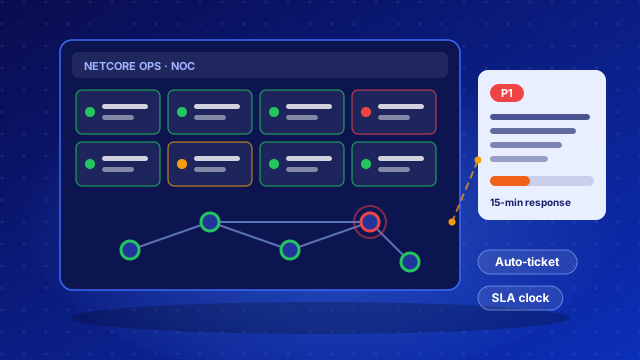
We watch your firewalls, switches, Wi‑Fi, internet links, servers, backups and power around the clock. Problems become tickets automatically, our engineers respond against an agreed SLA, and you follow everything in your Client Portal.
NetCore Ops is our own monitoring and service‑desk platform. An alert isn’t just a red light — it’s a ticket with an owner, a deadline and a record of what was done.
About the NetCore Ops platform — Hosted, Dedicated or On‑Premises →
All the major brands — health, interfaces and VPN tunnels.
Access points, connected users and fake networks pretending to be yours.
Each ISP measured against its contract, with the evidence when it falls short.
Windows, Linux, VMware and Proxmox — performance, services and updates.
Server hardware faults, UPS health and every power cut — so you can plan for load‑shedding.
Every backup job checked; a failure opens a ticket.
Uptime, certificate and domain expiry, and protection against email spoofing.
Critical services and the links between your systems and partners.
We list your sites and devices and agree what “critical” means for your business.
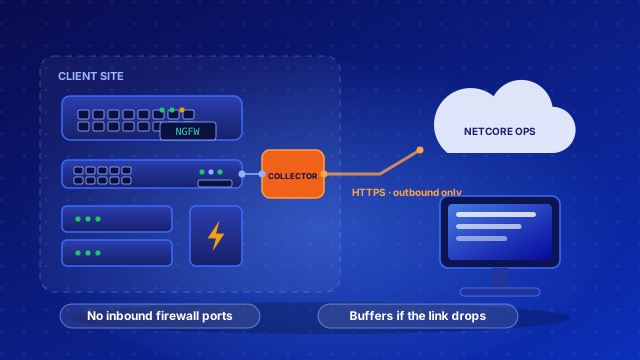
A small site collector is installed at each site — no inbound firewall ports needed.
For the first weeks we tune thresholds and dependencies so you get real alerts, not noise.
Our engineers respond to tickets against the agreed SLA; you follow everything in the Client Portal and get a quarterly business review.
One incident per real problem — not an alert storm.
Problems become tickets straight away and are escalated before the clock runs out.
Your whole network at a glance — and where traffic stops.
Configurations backed up, and unplanned changes flagged.
Devices checked against best practice and known vulnerabilities.
Warnings before disks fill up or warranties and licences lapse.
Fixes are reviewed and tested before a ticket is closed.
Changes are planned and approved by you before anything is touched.
Security updates installed in an agreed window.
Engineers connect with your agreement, and every session is logged for you to see.
Service results, risks and recommendations — ready for your management.
Network monitoring and the service desk are in every plan. Professional adds 24×7 NOC on‑call, patching, change management and full SOC; Enterprise adds major‑incident management, DR testing and compliance. Response and resolution targets are set by your plan and confirmed in your service agreement.
SMEs
See and protect.
Monitoring, endpoint protection and a service desk — the starting point for SMEs.
Get a quoteGrowing organisations
Managed and defended 24×7.
NetCore actively runs your environment — patching, configurations and backups — with full 24×7 SIEM and SOC.
Get a quoteBanks, fintechs & regulated
Governed and resilient.
Compliance, threat hunting, incident response and a named security manager — for banks, fintechs and regulated organisations.
Get a quoteNo. Our equipment only connects outwards to our platform — nothing on your network is exposed to the internet.
No. Apart from pre‑approved routine work such as patching in an agreed window, every change needs your approval.
Yes. We only need read‑only access — never your admin passwords.
Both share the same Client Portal, so network, service and security tickets are in one place.
A monthly fee based on what we look after. Ask us for a quote.
On NetCore’s secure platform, separated per client, encrypted, and handled in line with data protection laws such as Zimbabwe’s Cyber and Data Protection Act.
Sign in to the Client Portal to see your network status, tickets and reports. Need help? Email support@netcore.co.zw or call +263 71 801 0801.
Want security monitoring too? See Managed SOC & SIEM — it uses the same portal.
Tell us roughly how many sites, network devices and servers you have, and we’ll come back with a proposal. Send a quick WhatsApp message: